 RMON
RMON
- How to set up your Time zone
- How to create a Telegram bot and use it with RMON
- How to create a Slack APP and use it with RMON
- How to create PagerDuty Integration key and use it with RMON
- Notifications and alerting
- Status pages
- Security checklist
- Company sign-in with OIDC
- Get started with the RMON API
- Backup and recovery
- How to use groups and roles
- How to change user settings
Servers
Notifications and alerting
How alerting works
A notification channel tells RMON where to send an alert. A check uses only the channels selected in that check's settings.
- The check detects a failure or a configured threshold violation.
- RMON applies the retry setting before treating the result as an incident.
- An alert is sent to each channel assigned to the check.
- When the check becomes healthy again, RMON updates the state and sends or resolves the recovery event where the channel supports it.
Channels are shared settings. Create a channel once, test it, and then select it for any relevant checks in the same group.
Available channels
- Telegram: bot token and destination channel or chat.
- Slack: bot token and public channel name without
#in the current channel form. - PagerDuty: integration key and a recognizable integration name.
- Mattermost: incoming webhook and channel name.
- IncidentRelay: intake token and the service's base URL. See the IncidentRelay example for the exact URL format.
- Email: one or more recipient addresses and a recognizable list name.
For provider-specific preparation, see Telegram, Slack, and PagerDuty.

Create and test a channel
- Open Channels.
- Find the required provider and click + Add.
- Enter the credential or webhook and a clear channel name. If groups are available to you, select the group that should own the channel.
- Save the channel.
- Click Test on the new row and confirm that the test message reaches the expected destination.
Use names such as Operations Telegram, Critical PagerDuty, or Customer API Email. Clear names prevent users from selecting the wrong destination when editing a check.
You can edit the fields in the channel list, copy a channel's settings, or delete an unused channel. Test again after changing a token, webhook, destination, or mail configuration.
Assign a channel to a check
- Create a new check or edit an existing one.
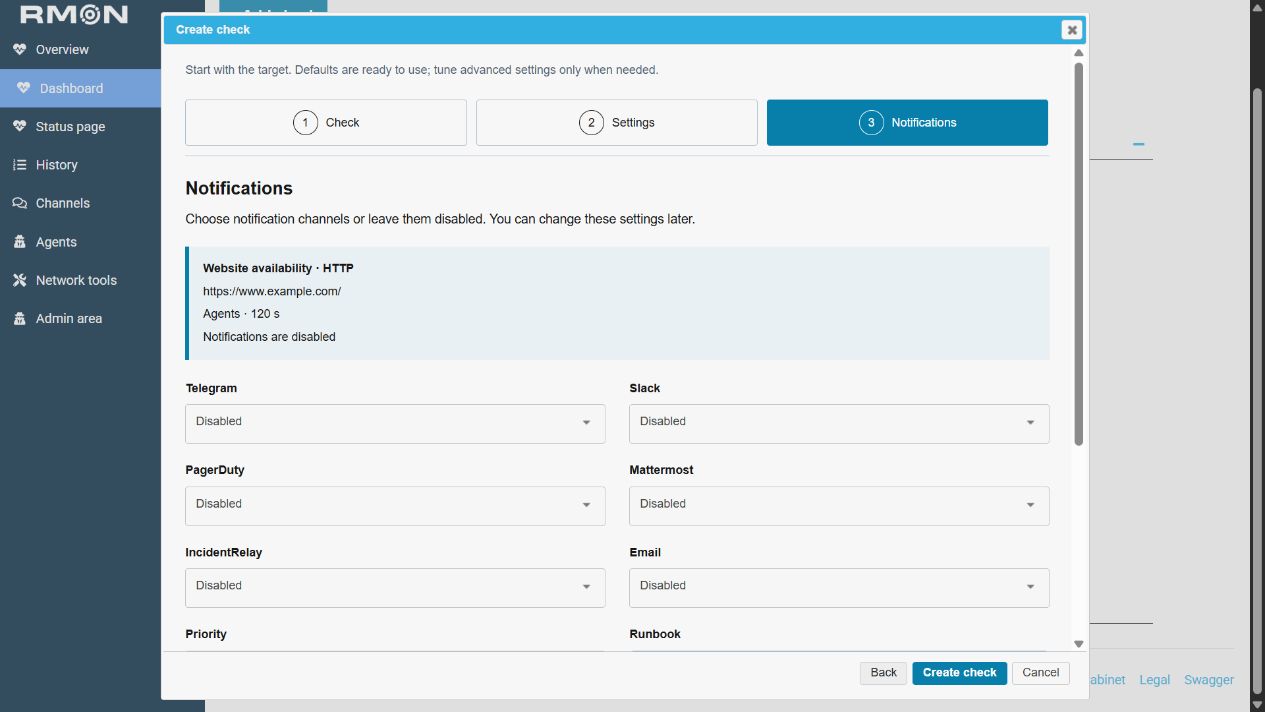
- In the Notifications step, choose a saved destination for Telegram, Slack, PagerDuty, Mattermost, IncidentRelay, and/or Email.
- Leave a provider set to Disabled when that check must not notify it.
- Select the incident Priority and add a Runbook link if responders have an instruction page.
- Save the check and verify the next result on the dashboard.
A check can notify several providers at the same time. A provider can have several saved destinations, but one destination per provider is selected in an individual check.
Retries, thresholds, and priority
- Retries: the maximum number of retry attempts before the service is marked down. Increase this carefully for services with occasional short network interruptions.
- Threshold timeout: the response time in milliseconds after which a reachable service is reported as too slow. Use 0 when no response-time threshold is required.
- Priority: Info, Warning, Error, or Critical. Choose the level according to customer and operational impact.
- Runbook: a link included with the alert so responders can open the correct recovery instructions.
- Expiration date: automatically disables a temporary check at the specified UTC date and time.
Start with settings that match the service objective, then review alert history. Too few retries can create noise; too many retries can delay notification of a real incident.
Troubleshooting
- The channel test fails: verify the credential, destination, provider permissions, and outbound access from RMON.
- Email does not arrive: ask an administrator to verify the mail settings, then check spam filtering and the recipient list.
- The test works but a check sends nothing: edit the check and confirm that the intended channel is selected instead of Disabled.
- The wrong team receives alerts: review the selected destination, channel name, and owning group.
- Alerts arrive too often: review retries and the response-time threshold, then confirm that the expected result for the check is correct.
- No recovery is visible: first confirm that the latest check result is healthy; then test the channel and review the alert destination.
Understand alerts from several locations
When one check runs in several locations, related failure events can arrive as one notification listing the affected locations. RMON collects events with the same check, failure condition and severity together, then sends a message if that condition is not already active. Checks that merely share a Dashboard display group are not combined into one incident.
Notification processing runs periodically, normally every 30 seconds. Allow for this additional delay after the check interval and retries. Events that reach RMON together may be included in a single message; a later location failure need not produce another message while the same condition is already active.
- A continuing incident: repeated failures of the same condition are suppressed while it remains active. RMON does not send a reminder on every check interval.
- A different condition: for example, a response-time warning can be tracked separately from an availability failure.
- A recovery: a recovery event for an active condition can produce a resolution message. Review fresh results for every required location; the message alone does not confirm that every location is healthy.
- A channel test: tests destination delivery directly. It does not demonstrate grouped incidents, retries or recovery matching.
For example, if the same website condition fails in London and Paris before the next notification pass, one message can list both places. The location count in that message describes the events collected for it. Open the check's results and history for the current situation and use the disposable-check exercise to test incident delivery.
Worked example: post to Mattermost
Use an incoming webhook for a channel such as rmon-alerts. The complete webhook URL is a secret. Follow Mattermost's incoming webhook guide for provider permissions and preparation.
- In Mattermost, open Integrations → Incoming Webhooks, add a webhook and select the destination channel. If integrations are unavailable, ask the Mattermost administrator to enable incoming webhooks or create one for you.
- Copy the generated URL, which has the form
https://chat.example.com/hooks/REPLACE_WITH_WEBHOOK_SECRET. Keep the webhook's channel restriction aligned with your intended destination. - In the owning RMON group, open Channels → Mattermost → + Add.
- Paste the entire URL into Token (the Incoming Webhook field, shown as Webhook in the saved list). In Channel, enter
rmon-alerts, using the actual channel name rather than its display title or browser URL. - Save, click Test and confirm that the message appears in that channel.
- Select the destination on a check's Notifications step, then complete the failure-and-recovery test.
For a private channel, verify that the webhook creator has access. If delivery fails, check the webhook URL, channel name, channel restrictions and outbound access from both RMON and its result server. After rotating the webhook, update the saved field and repeat the tests.
Worked example: send incidents to IncidentRelay
Obtain the RMON route's intake token from your IncidentRelay administrator and agree which team or service should receive these events. Follow the IncidentRelay route token guide: this token belongs to the receiving route. RMON's channel test checks intake; receiving an event and notifying the on-call team are separate steps to verify.
- Confirm the IncidentRelay HTTPS address reachable from RMON and its result server, for example
https://incidents.example.com. - In the owning RMON group, open Channels → IncidentRelay → + Add.
- Enter the intake token in Token. Enter the base address
https://incidents.example.comin URL. - Save and click Test. Confirm receipt in IncidentRelay and check which receiving rule handled the test event.
- Select the destination on a real check or a disposable test check. Add a runbook and choose an appropriate priority.
- Complete the failure-and-recovery exercise. Verify incident creation, routing to the intended responders and the recovery event.
RMON adds /api/integrations/rmon to the saved base address. Do not include that suffix in URL: entering the full intake endpoint would append the path twice. If your service uses a URL prefix, obtain the correct base address from its administrator.
Failure events are sent as firing and recoveries as resolved. RMON supplies check and incident identifiers to help match related events; a channel test may not contain the same check context as a monitoring incident. Verify routing with the disposable check as well as Test.
| Symptom | What to check |
|---|---|
| 401 or 403 at intake | Verify the active intake token and its permission to submit RMON events. |
| 404 at intake | Check the base URL and any deployment prefix. Remove a duplicated /api/integrations/rmon suffix. |
| Event is received but nobody is notified | Review the matching service/team rule, severity filters and notification or escalation configuration in IncidentRelay. |
| Channel test works but a monitoring incident does not | Check the saved destination on the check, result-server connectivity, incident history and the routing rule used for that check. |
Worked example: email the operations team
- Ask the installation administrator to configure Settings → Mail: SMTP host/port, sender, login credentials and the supported STARTTLS option. Confirm that the sender is permitted by the mail provider.
- In your group's Channels → Email section, add a destination named
Operations email. - Enter the intended recipient addresses, for example
operations@example.com, oncall@example.com, and save. Use your own addresses. - Click Test and verify receipt in each mailbox. Check spam/quarantine and mail logs if the interface returns but no message arrives.
- Edit the check and select Operations email on its Notifications step.
The SMTP sender account belongs in the mail settings. The channel contains recipients. Changing the server connection should be followed by another test for the destinations that depend on it.
Verify a failure and recovery without disrupting a service
A channel test checks delivery to a destination. Use this exercise to confirm that a real check's conditions, selected channels and recovery work together. Choose a test destination or coordinate with the responders first.
- Create a disposable HTTP check named
Alert delivery testfor a stable endpoint you control. Select one working agent and the destination you want to verify. - Set the correct expected status, for example
200, and wait for a fresh healthy result. - Edit only this test check's Accepted Status Codes to a value that the endpoint does not return, for example
418when it returns 200. Save. The monitored application stays running. - Wait for the configured interval and retries. Confirm that RMON records the failed condition and that the alert reaches the selected destination. Record the check name, time and location.
- Restore the correct expected status and save. Wait for a fresh healthy result, then confirm a recovery message or resolution at the destination.
- Disable or delete the disposable check, and close any remaining test incidents according to your team's process.
If the destination test works but this exercise fails, inspect the check's selected channels, incident history and receiver notification logs. Changing priority or clicking Test repeatedly does not correct an unassigned destination.
Maintain destinations
After changing a token, webhook, SMTP account or destination name, repeat both the channel test and the disposable-check exercise. Review checks that select a destination before deleting it. Use a replacement destination and test its assigned checks before retiring the old one.