 RMON
RMON
- How to set up your Time zone
- How to create a Telegram bot and use it with RMON
- How to create a Slack APP and use it with RMON
- How to create PagerDuty Integration key and use it with RMON
- Notifications and alerting
- Status pages
- Security checklist
- Company sign-in with OIDC
- Get started with the RMON API
- Backup and recovery
- How to use groups and roles
- How to change user settings
Servers
Network requirements
Use this page when preparing hosts, firewall rules, DNS and certificates for RMON. Record the source, destination and configured port of each connection. The ports below are defaults or examples; use your actual settings when they differ.
Connection directions
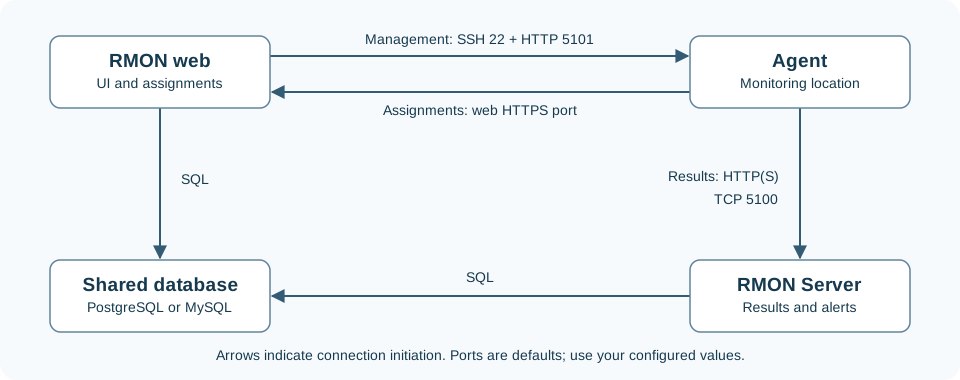
Keep these three agent connections distinct: RMON manages the agent, the agent retrieves assignments from the web application, and the agent sends measurements to a result receiver. Enabling HTTPS or mTLS for results changes the receiver connection. The agent management API continues to use HTTP on its restricted management network.
Required access
Scroll horizontally to view the full table.
| Source → destination | Default or configured port | Purpose and access |
|---|---|---|
| User browser → RMON web address | HTTPS, TCP 443 | Sign-in and the web interface. API clients use the same public address. Use the published web port when customized. |
| RMON web host/container → agent host | SSH, TCP 22 or the server record's Port | Install, reconfigure, start, stop and restart agents using saved SSH credentials. Allow the RMON source address and required administrator access. |
| RMON web host/container → agent management address | HTTP, TCP 5101 by default; each agent has its own configured port | Agent status and check management. Limit access to RMON on a private network or VPN; keep this endpoint off the public internet. |
| Agent → RMON assignment address | The web HTTPS port, or the separately configured control listener | Retrieve assignments. Set a reachable control URL; a custom listener such as TCP 5444 must be opened explicitly when used. |
| Agent → RMON Server | TCP 5100 by default; HTTP, HTTPS or HTTPS + mTLS | Deliver results. Match the configured receiver address, port and delivery mode. Restrict receiver access to the agent networks. |
| RMON web → RMON Server diagnostics | The receiver's configured HTTP(S) port | Read receiver version and health when this connection is configured. Use the internal API token and required CA/client certificates. |
| RMON web and every result receiver → database | PostgreSQL TCP 5432 or MySQL TCP 3306, unless customized | Access the same RMON database. SQLite uses local files; it has no network port. Use PostgreSQL or MySQL for receivers on different hosts. |
| Agent → monitored target | Ports and protocols configured by the check | HTTP(S), DNS, TCP, SMTP or RabbitMQ traffic originates at the agent. Ping uses ICMP. Allow access from every selected monitoring location. |
| RMON and agent hosts/containers → DNS resolvers | Usually UDP/TCP 53, according to the resolver setup | Resolve the names used for web access, assignments, receivers, databases, providers and monitored targets. |
These arrows show who initiates the connection. Allow the corresponding return traffic. A working browser session does not test connectivity from an agent, and a successful SSH connection does not test result delivery.
Optional services
Scroll horizontally to view the full table.
| Feature | Access to provide |
|---|---|
| Notification channels | Allow the web application for channel tests and the result receiver for incident delivery to reach the configured provider. HTTPS APIs normally use TCP 443; email uses your SMTP host and configured port. See notifications. |
| Company sign-in | Browsers reach the identity provider and RMON callback address; RMON reaches the provider's discovery, token and signing-key endpoints over HTTPS. Follow OIDC setup. LDAP/LDAPS uses the directory host and port supplied by its administrator. |
| VictoriaMetrics | Allow result receiver → write endpoint and RMON web → query endpoint on their configured ports. Follow metrics setup. |
| Installation and updates | Deployment hosts need access to the package or image source supplied for the installation, directly or through the configured proxy. Agent hosts also need the selected agent image available before deployment. |
Docker, DNS and certificates
- Choose addresses reachable from the connection's source. Inside a container,
localhostrefers to that container. A Compose service name such asserveris useful within its Docker network; remote agents need a reachable host address. - The optional Docker receiver is published on
127.0.0.1:5100by default. Remote agents require an explicitly published private interface or a suitable gateway. Check Docker port publication as well as host and network firewall rules. - Set the public web URL for browsers and the agent control URL for assignments. Set
master_ipandmaster_portfor result receivers in RMON settings. These addresses can differ. - HTTPS certificates must cover the DNS name or IP address actually used by each client. Configure trust for a private CA or self-signed certificate; retain certificate verification.
- For mTLS, each agent, diagnostics client and health probe also needs a trusted client certificate and key. Configure the receiver first, then Reconfigure affected agents and verify fresh results.
- Use the separate control-listener instructions when assignments also require client certificates. Keep the normal browser interface accessible with its intended sign-in method.
Verify from the actual source
- Open RMON over HTTPS from a user's device and confirm DNS and certificate trust.
- Run Admin area → Servers → Check SSH. Then inspect the agent card to test management access separately.
- Verify receiver readiness on its host, including database access.
- Create a test check on each required agent. Confirm a new result, then another result at the configured interval; this checks assignments, target access and result delivery together.
- Test a notification destination and verify a controlled test incident. For optional integrations, use their own verification steps.
When one step fails, investigate that connection's source, destination, DNS, port and authentication. Use Network tools for target connectivity and service logs for reported connection or certificate errors.