 RMON
RMON
- How to set up your Time zone
- How to create a Telegram bot and use it with RMON
- How to create a Slack APP and use it with RMON
- How to create PagerDuty Integration key and use it with RMON
- Notifications and alerting
- Status pages
- Security checklist
- Company sign-in with OIDC
- Get started with the RMON API
- Backup and recovery
- How to use groups and roles
- How to change user settings
Servers
Manage Agents
Agents run checks from the locations you choose. Install and manage them from Agents in the main menu. One server can host one RMON agent.
Prepare the host
- Save SSH credentials and add the host in its intended group. Run Check SSH.
- Use a supported Debian/Ubuntu or Enterprise Linux host with a running SSH service. The account needs non-interactive sudo access to install and manage the agent.
- Allow the host to obtain the selected agent version and required operating-system packages. RMON installs Docker when it is missing.
- Have the installation administrator set
master_ipandmaster_portunder Admin area → Settings → RMON. For example, useresults.example.comand5100. Enter addresses without a scheme; separate multiple addresses with commas. - Allow the agent to reach the RMON website, all configured receivers and its monitoring targets. Allow RMON to reach the agent management port, normally
5101, and restrict that port to the monitoring network.
For an agent on the same Docker host, a server named localhost still needs the host's reachable address. The container's 127.0.0.1 does not address the physical host. Existing configuration, data and log paths remain /etc/rmon/rmon-agent.cfg, /var/lib/rmon/rmon-agent and /var/log/rmon; existing certificate paths are retained.
Install an agent
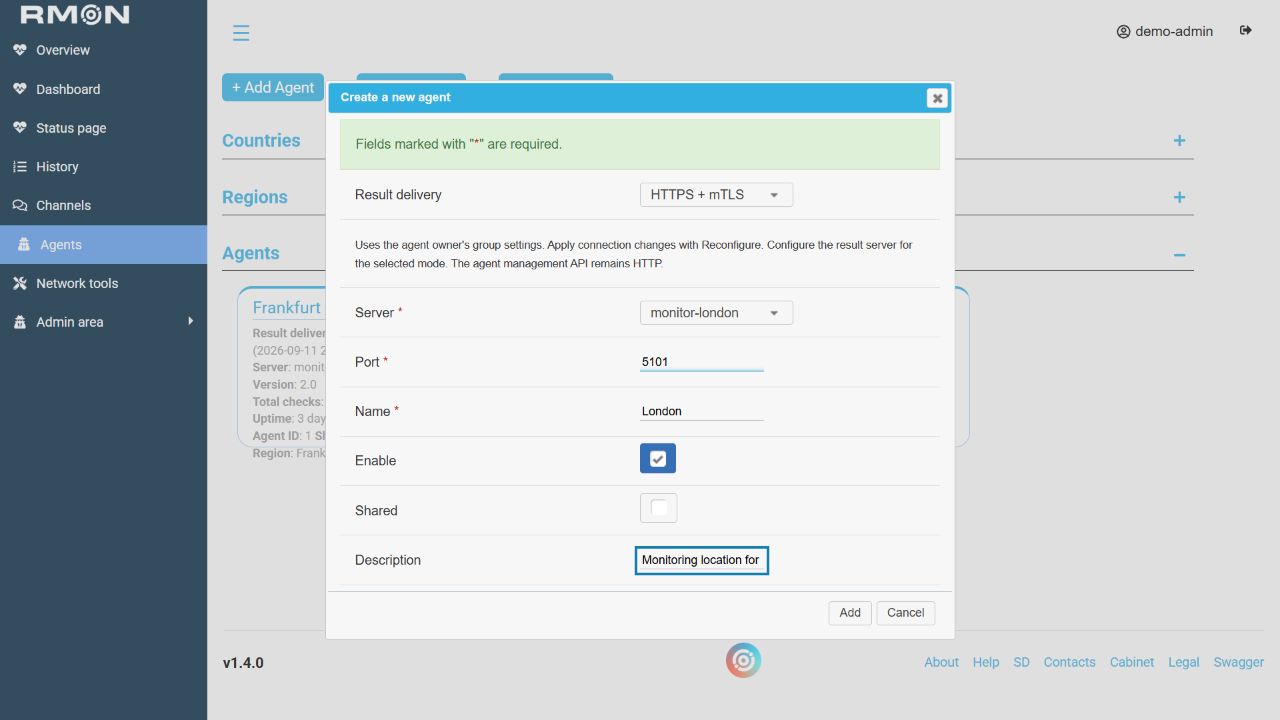
- Open Agents and click Add Agent.
- Select the server. If it is absent, check its group, enabled state and whether it already has an agent.
- Enter a descriptive name, such as
London office. Keep port5101unless your administrator has chosen another free management port. - Choose Result delivery: HTTP, HTTPS or HTTPS + mTLS. Prepare that mode using the examples below before starting.
- Enable the agent, set its description and leave Shared off unless other groups should use this location.
- Click Add and wait for the installation task to complete. You can continue using RMON while it runs.
Verify: review the agent card, assign its region if needed, and create a new check explicitly on that agent. Confirm a fresh successful result and then another result at the configured interval. A completed installation or a displayed version alone does not prove delivery.
Agent installation, reconfiguration, removal and start/stop/restart actions are queued. An idle installation can take up to 30 seconds to pick up a new operation. Operations on the same server run in order. Wait for the reported result before submitting the action again. Completed and failed operation records are retained for 30 days; pending and running operations are preserved.
Queued operations survive service restarts. An interrupted operation can be retried automatically after RMON detects the interruption; repeated interruptions eventually mark it failed. Check the existing task and the actual agent state before submitting the action again. See queue troubleshooting if a task remains pending.
Choose the result-delivery connection
Open Admin area → Settings → Agent connections in the group that owns the server. That group supplies the certificate paths even when the agent is shared with other groups.
Scroll horizontally to view the full table.
| Mode | Receiver preparation | Agent group preparation |
|---|---|---|
| HTTP | Accept HTTP on the configured result port. | Select HTTP. Certificates are not used for results. |
| HTTPS | Present a valid certificate matching the address used by agents. | Select HTTPS; provide a Trusted CA for a private CA, or leave it empty for system trust. |
| HTTPS + mTLS | Present a trusted certificate and require trusted client certificates. | Provide the Trusted CA plus existing client credentials or the signing CA needed to generate them. |
The result server is configured manually using the receiver connection guide. These settings secure result delivery. The agent management API continues to use HTTP on its restricted management port. A monitored website's mTLS credentials are configured separately on its HTTP check.
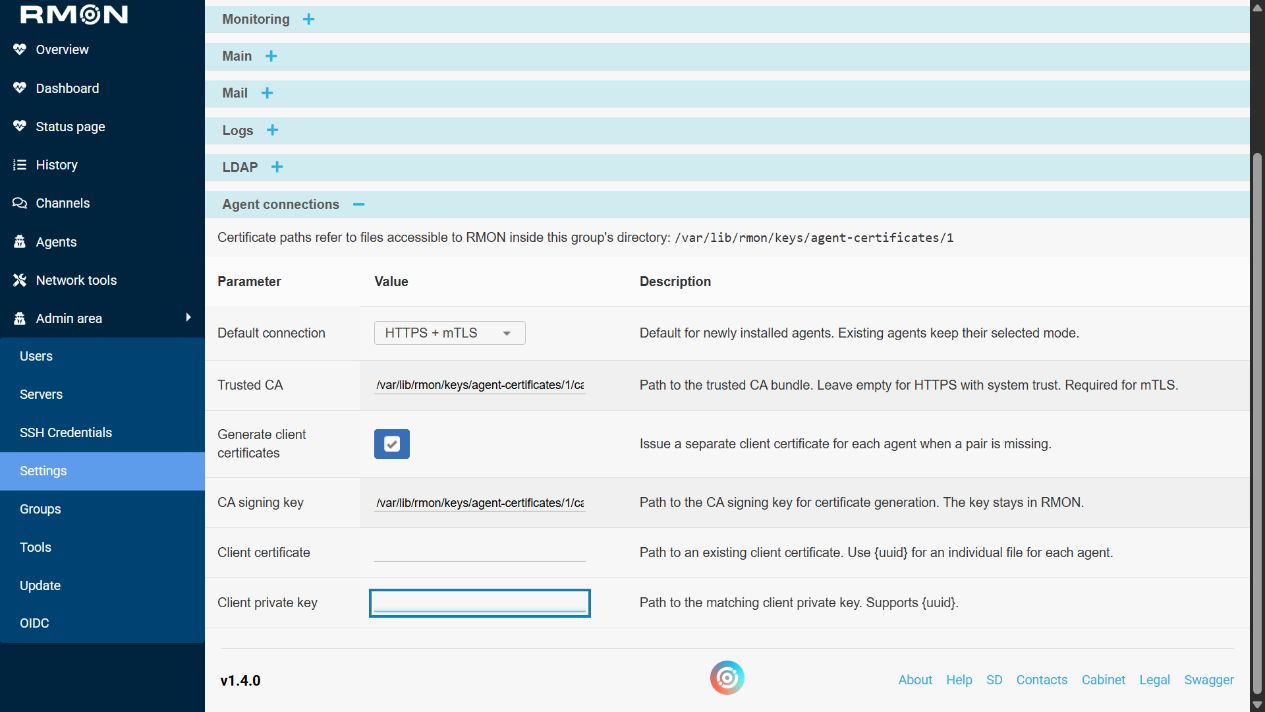
Example: HTTPS
- Configure the receiver at
results.example.com:5100to accept HTTPS with a certificate forresults.example.com. - If a private CA signed the certificate, place its CA bundle in the directory shown in the group settings. Set Trusted CA to that full path. For a certificate trusted by the agent's system, leave this field empty.
- Set Default connection to HTTPS if new agents should use this mode. Leave the client certificate and private key fields unused for HTTPS.
- Install a new agent with HTTPS selected, or edit an existing agent and apply HTTPS with Reconfigure.
- Wait for success, check the applied mode on the card, and verify a new monitoring result.
If the group directory is /var/lib/rmon/keys/agent-certificates/1, an example Trusted CA value is /var/lib/rmon/keys/agent-certificates/1/ca.crt. Replace the group directory with the one displayed in your installation. A DNS certificate will not validate an IP connection unless the IP is also included in that certificate.
Example: mTLS with generated client certificates
Use this workflow when the administrator permits RMON to issue agent client certificates. The receiver must trust the issuing CA and reject clients that do not present a trusted certificate.
- Prepare the receiver for mTLS before applying agent changes.
- Place the trusted CA certificate and its matching signing key inside the owner group's displayed certificate directory. Make them readable by the RMON service account; allow it to write the directory for certificate generation. Keep private keys restricted to that account with mode
0600. - Set Trusted CA to the CA certificate path and CA signing key to the matching key path.
- Enable Generate client certificates. Leave Client certificate and Client private key empty so RMON can issue a missing pair for each agent.
- Select HTTPS + mTLS during installation or reconfiguration. RMON retains an existing complete pair on the agent and validates it; enabling generation is not a request to replace every existing certificate.
- After the task succeeds, verify the applied mode and a new monitoring result.
Example paths for the group directory above are /var/lib/rmon/keys/agent-certificates/1/ca.crt and /var/lib/rmon/keys/agent-certificates/1/ca.key. Enter paths rather than pasting file contents. The CA signing key stays in RMON and is not copied to the agent.
Example: mTLS with supplied client certificates
- Obtain a current client-authentication certificate and its matching private key, issued by a CA the receiver trusts.
- Place the Trusted CA bundle and client files inside the group's certificate directory and make them readable by RMON.
- Set Trusted CA, disable Generate client certificates, and fill in both Client certificate and Client private key. The CA signing key can remain empty.
- For individual files on existing agents, use paths such as
/var/lib/rmon/keys/agent-certificates/1/{uuid}/agent.crtand/var/lib/rmon/keys/agent-certificates/1/{uuid}/agent.key. Have the administrator prepare each directory using the corresponding existing agent identity. The numeric Agent ID displayed on the card is not its UUID. - Select HTTPS + mTLS and run Reconfigure. Correct missing, expired, untrusted or mismatched files before retrying.
Use separate client credentials for each agent. A fixed client path in group settings refers to the same file for every agent that uses it. For new agents that need individual certificates immediately, the generation workflow handles their identities during installation.
Apply settings to an existing agent
- Record the currently working delivery mode and prepare the receiver for the change. Coordinate a maintenance window if changing the receiver will interrupt other agents.
- Finish saving the group paths and verify that the files are present.
- Edit one agent, select the intended Result delivery mode and click Reconfigure.
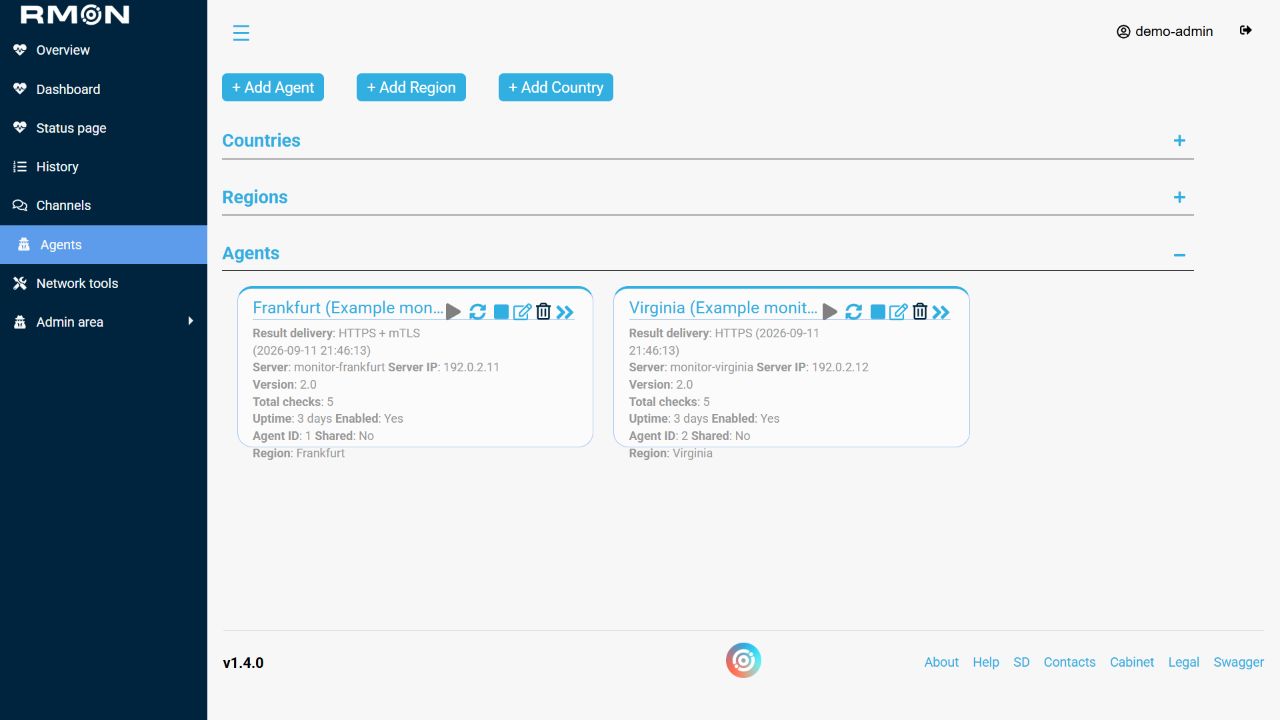
- Wait for the task's final status. Review the card's last applied mode, verification time and any Changes pending application message.
- Create a new check on this agent and verify fresh results before repeating the change on the remaining agents.
A changed group default only preselects new installations. Saving group settings or an agent's desired mode does not apply them to its running service. Older installations show Not yet verified until a mode is explicitly selected and successfully applied; Keep current configuration preserves their existing transport.
After replacing a certificate file at the same path, run Reconfigure explicitly even if no pending-change label appears. A failure leaves the last successful mode recorded; review the task and actual service state before retrying. Installation attempts to restore the previous agent if replacement fails.
Start, stop, move and update
Scroll horizontally to view the full table.
| Action | Use and verification |
|---|---|
| Start / Stop / Restart | Manage the service over SSH. After starting or restarting, verify that new results resume. |
| Reconfigure | Apply connection settings or the agent version selected by the administrator. Restart alone does not apply those changes. |
| Move checks | Transfer all checks assigned to this agent to a working destination. Follow the replacement walkthrough before retiring the source. |
| Delete | Retire the agent after transferring required monitoring. Installation data and backups should remain available until replacement monitoring is verified. |
Open the agent's name to inspect its assigned checks and available information. A group's shared agent still uses its owner's access and certificate settings. If an operation fails, use agent installation troubleshooting; if the agent runs but measurements stop, use result-delivery troubleshooting.
Replace an agent and transfer its checks
Use this procedure when replacing an agent host. Transfer checks from this agent to another moves all checks assigned to the source agent, across check types. There is no per-check selection in that dialog. For a shared agent, coordinate with every team using it before transferring its workload.
Prepare the replacement
- Record the source agent's name, ID, region, assigned checks and latest result times. Keep the old host and its configuration available until the replacement is verified.
- Install the replacement agent with the intended group, location, SSH access and result-delivery mode. Use a different host; one host can have one RMON agent.
- Verify that the new host can reach every required monitoring target, including private networks, DNS servers and authenticated endpoints.
- Create a temporary check explicitly on the replacement and confirm fresh results over at least two intervals. Remove the temporary check when the test is complete.
Transfer and verify
- Keep both agents available and arrange the change with responders. Transferring checks can interrupt measurements; it does not guarantee uninterrupted monitoring.
- Open the source agent's actions and choose Transfer checks from this agent to another.
- Select the prepared destination agent, double-check that it differs from the source, then click Transfer once.
- Refresh both agents and inspect their assigned checks. Confirm that the source has no remaining checks to transfer and that the destination has the expected workload, including any checks it already had.
- Open each required check and verify new results from the destination. Check target access, response conditions and timings over at least two intervals.
- Review location selections in the check editor, especially when changing region or using explicitly selected agents. Confirm the intended assignments again after any subsequent edit.
- Verify a disposable alert from the replacement if notification delivery is part of the change. Stop the old agent only after the transferred monitoring is working, then remove its entry when the team no longer needs it.
Transfer changes where checks run; it does not install the destination agent or copy the source host's SSH credentials, certificates or network access. A successful dialog close is not sufficient verification. Keep the source host available until fresh results and the intended workload are confirmed.
If a transfer is interrupted
Inspect both agents and the check assignments before retrying. Some checks may already have moved, and a retry can transfer those still on the source. Restore connectivity and resolve the reported failure first. Do not delete either agent while the outcome is uncertain.
To move everything back, first verify that the original agent works and review the complete workload now on the replacement. Its Transfer action would move all of those checks, including any that were there before this operation. When only selected checks need to return, review their location assignments individually in the check editor and verify the new results.